A citation is only useful if a reader can check it. PageIndex Cloud cites an answer down to a block on the page, such as one paragraph or one table, so you can highlight the exact source on the page image.
Ask NVIDIA’s annual report for last year’s revenue, in three steps:
- Ask with citations.
- Turn the citations into pages and boxes.
- Draw each box on its page.
Set up
pip install -U pageindex requestsOur read-only demo key reads NVIDIA’s annual report, already indexed on PageIndex Cloud, and your OpenAI key answers the question:
import os
from pageindex import PageIndexClient

os.environ["PAGEINDEX_API_KEY"] = "pageindex_demo_readonly_key"
os.environ["OPENAI_API_KEY"] = "Your OpenAI API key here"

client = PageIndexClient(index="cloud", chat="gpt-5.6-luna")
doc_id = "pi-cmu3rrhyb00280dnsyshkq578"  # NVIDIA's annual report
Ask with citations
With citations=True, each sentence of the answer ends with a <cite> tag. The tag says which document, page and block the sentence came from.
answer = client.chat("What is the revenue in last year", doc_id=doc_id, citations=True)
print(answer)
NVIDIA's revenue in the prior fiscal year (fiscal 2025, ended January 26, 2025) was **$130.497 billion**. <cite doc="NVIDIA-FY2026-10-K.pdf" page="37" block="p37_table_6"/>
For comparison, fiscal 2026 revenue was **$215.938 billion**, an increase of 65%. <cite doc="NVIDIA-FY2026-10-K.pdf" page="40" block="p40_table_5"/>block="p37_table_6" points at one table on page 37, not the whole page.
Resolve the citations
get_citations() turns each <cite> tag into a dict you can use in code:
citations = client.get_citations(answer)
citations
[{'document': 'NVIDIA-FY2026-10-K.pdf',
'doc_id': 'pi-cmu3rrhyb00280dnsyshkq578',
'page': 37,
'block_id': 'p37_table_6',
'bbox': [26, 378, 975, 512],
'block_type': 'table',
'text': '| | Year Ended | | |\n| --- | --- | --- | --- |\n...'},
...]bbox is the box around the table: [left, top, right, bottom], measured in thousandths of the page. text is what the table says.
Highlight the source
Fetch the page image and draw the box with highlight_region():
import requests
from pageindex import highlight_region

c = citations[0]
url = client.get_page_image(c["doc_id"], c["page"])
image = highlight_region(requests.get(url).content, c["bbox"])
image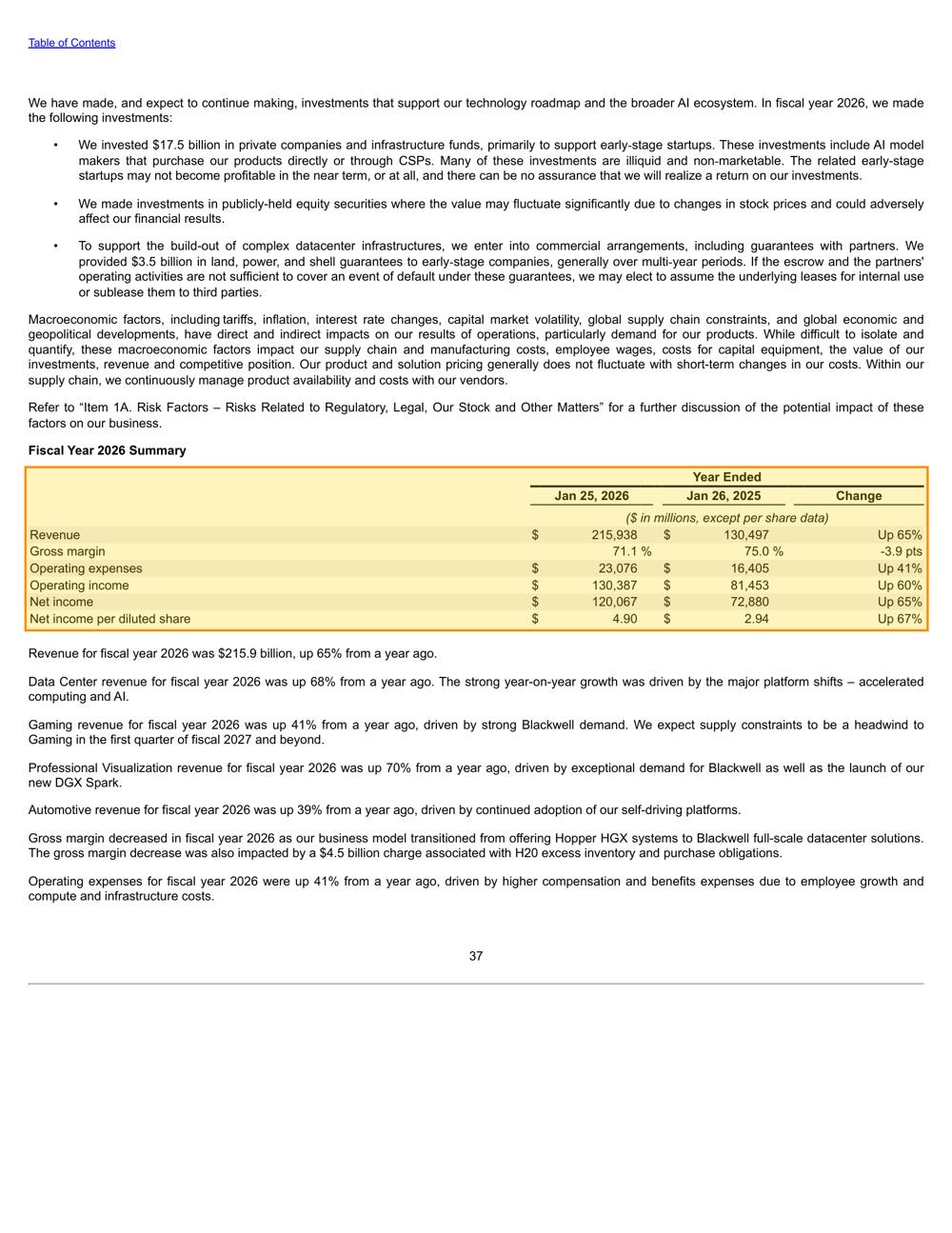
The box frames the table whose Revenue row reads $215,938 and $130,497 million: the two figures in the answer. A reader can check the answer on the page instead of searching the report.
Result
Every sentence of the answer leads back to the exact table it came from.
The notebook runs this with your key: open it in Colab .